How to Download Aadhaar Card Online: Step-by-Step Guide
How to Download Aadhaar Card Online
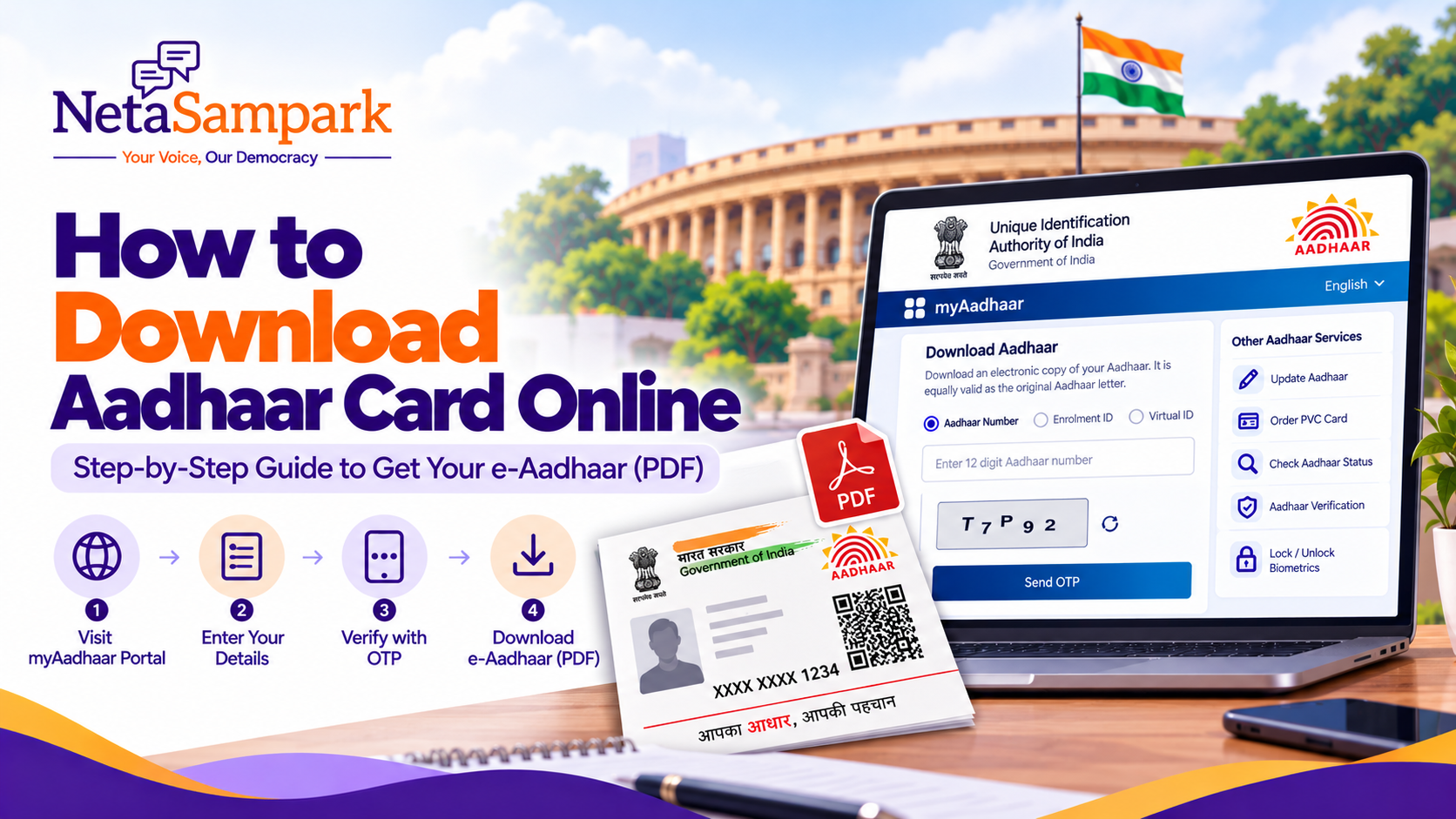
You can download your Aadhaar card online from the official Unique Identification Authority of India (UIDAI) portal without visiting an Aadhaar enrolment centre. The downloaded electronic copy, called e-Aadhaar, is digitally signed by UIDAI and is equally valid as the physical Aadhaar letter.
You can use your 12-digit Aadhaar number, Enrolment ID (EID) or another supported identification option on the official portal to retrieve your e-Aadhaar. You will generally need access to the mobile number registered with your Aadhaar to complete OTP verification.
Official download portal: Download Aadhaar from UIDAI
Quick Guide: Aadhaar Card Download Online
Official website: myAadhaar portal
Cost: Free
File format: Password-protected PDF
Details you may need: Aadhaar number, Enrolment ID or another supported identifier
Verification: OTP sent to your registered mobile number, or another method supported by the official service
Validity: e-Aadhaar is equally valid as the physical Aadhaar letter
Steps to Download Aadhaar Card Online
Follow these steps to download your e-Aadhaar PDF.
Step 1: Visit the Official UIDAI Website
Open the official myAadhaar portal.
Make sure you are using the genuine UIDAI website. Avoid unofficial websites that ask for Aadhaar details or charge a fee for downloading e-Aadhaar.
Step 2: Select the Aadhaar Download Service
Find and select the Download Aadhaar service.
The portal will display the available options for retrieving your Aadhaar.
Step 3: Enter Your Aadhaar Details
Choose the identification method supported by the portal. Depending on the available options, you may be able to use:
Aadhaar Number (UID): Your 12-digit Aadhaar number.
Enrolment ID (EID): The enrolment identification number provided when you applied for Aadhaar.
Virtual ID (VID): Your 16-digit Virtual ID, where supported.
Enter the required details carefully and complete any captcha or security verification displayed on the page.
If you have not received your Aadhaar number yet, you may need to check whether your enrolment has been processed before attempting to download it.
Step 4: Complete OTP Verification
Request the one-time password (OTP) and enter it when prompted.
The OTP is generally sent to the mobile number registered with your Aadhaar. Follow the instructions displayed by UIDAI to complete verification.
If you no longer have access to your registered mobile number, see the troubleshooting section below.
Step 5: Download the e-Aadhaar PDF
After successful verification, select the download option.
Your e-Aadhaar will be downloaded as a PDF file. Save it in a secure location on your device so that you can access it when required.
Important: Downloading e-Aadhaar from the official UIDAI portal is free.
How to Open the Downloaded Aadhaar PDF
The e-Aadhaar PDF is password-protected. You must enter the correct password to open it.
What Is the e-Aadhaar PDF Password?
The standard password format is:
First four letters of your name in CAPITAL letters + your year of birth in YYYY format.
Examples:
| Name on Aadhaar | Year of birth | PDF password |
|---|---|---|
| SURESH KUMAR | 1990 | SURE1990 |
| SAI KUMAR | 1990 | SAIK1990 |
| RIA | 1995 | RIA1995 |
Use the name as recorded in Aadhaar and follow UIDAI's password instructions. If your name has fewer than four letters, use the available letters followed by your year of birth.
If the password does not work, check the spelling of your name, the year of birth and whether you have entered the letters in uppercase.
How to Download Masked Aadhaar
A Masked Aadhaar is an e-Aadhaar version in which the first eight digits of your Aadhaar number are hidden. Only the last four digits remain visible.
This option can help reduce the exposure of your full Aadhaar number when you do not need to share all 12 digits.
To download it:
Visit the myAadhaar portal.
Open the Download Aadhaar service.
Enter the requested Aadhaar details and complete verification.
Select the masked Aadhaar option if it is available.
Download the PDF and open it using the applicable password.
Before sharing an Aadhaar document, check whether the organisation requesting it accepts masked Aadhaar for the specific purpose.
Is Downloaded e-Aadhaar Valid?
Yes. UIDAI states that e-Aadhaar is equally valid as the physical Aadhaar letter.
It is a digitally signed electronic document and can be used where Aadhaar is accepted, subject to the requirements of the organisation or service requesting it.
You do not have to order a physical Aadhaar PVC card simply because you downloaded your Aadhaar online.
For more information, visit the official UIDAI Aadhaar services page.
How to Download Aadhaar Without a Registered Mobile Number
Online Aadhaar download generally requires OTP verification using the mobile number registered with Aadhaar, unless the official service offers another supported authentication method.
If you cannot access your registered mobile number, try these steps:
Check the official Aadhaar app: UIDAI's official app provides various Aadhaar services, including e-Aadhaar download. Check the current authentication requirements in the app.
Visit an authorised Aadhaar centre: If you need to update your registered mobile number, check the applicable process and requirements with UIDAI.
Contact UIDAI: Call the toll-free helpline at 1947 for guidance on available options.
Do not share your OTP, Aadhaar details or other sensitive information with unofficial agents claiming they can bypass UIDAI's verification process.
What to Do If You Cannot Download Aadhaar Online
Sometimes, the download process may fail because of an incorrect identifier, OTP problems or a pending enrolment or update request.
1. OTP Not Received
Confirm that your mobile phone has network coverage.
Check whether the mobile number you are using is the one registered with Aadhaar.
Wait briefly before requesting another OTP.
Follow the portal's instructions if you have requested too many OTPs.
2. Aadhaar Number Not Recognised
Check that you have entered the 12-digit Aadhaar number correctly. If you recently enrolled, your Aadhaar may not have been generated yet.
You can check the relevant enrolment or update status through the myAadhaar portal.
3. Enrolment ID Not Available
Look for your enrolment acknowledgement slip or other enrolment records. If you have lost your enrolment details, use UIDAI's official retrieval services, where available, or contact UIDAI for assistance.
4. PDF Password Not Working
Check the first four letters of the name recorded in Aadhaar, use uppercase letters, and confirm the year of birth is entered in four-digit format.
5. Download Page Not Working
Try the official portal again later, check your internet connection or use another updated browser. Always begin from the official UIDAI website rather than a third-party download page.
Is There a Fee to Download Aadhaar?
No. Downloading e-Aadhaar from the official UIDAI portal is free.
A physical Aadhaar PVC card is a separate service and has a prescribed charge. You do not need to pay for a PVC card simply to obtain a digital copy of Aadhaar.
For current service charges, check the official UIDAI website.
How to Keep Your Aadhaar PDF Secure
Your Aadhaar contains personal information. Take these precautions when downloading and storing it:
Download Aadhaar only from official UIDAI services.
Do not share your OTP with anyone.
Avoid saving the PDF on public or shared computers.
Do not send your full Aadhaar document to unverified individuals or websites.
Consider using Masked Aadhaar when the full number is not required.
Delete unnecessary copies from devices you no longer use.
Check whether a recipient accepts an alternative form of identity verification before sharing your Aadhaar.
Remember that you should never disclose your Aadhaar PDF password to an untrusted person.
Frequently Asked Questions (FAQs)
1. Can I download my Aadhaar card online for free?
Yes. You can download e-Aadhaar for free through the official myAadhaar portal.
2. Can I download Aadhaar using my Aadhaar number?
Yes. Select the Aadhaar download service, enter your 12-digit Aadhaar number and complete the required verification.
3. Can I download Aadhaar using my Enrolment ID?
Yes, if your enrolment details are eligible for retrieval and the option is available on the official portal. Enter the requested enrolment details and complete verification.
4. What is the password for the Aadhaar PDF?
The standard password is the first four letters of your name in uppercase followed by your year of birth in YYYY format. For example, if your name is SURESH and your birth year is 1990, the password is SURE1990.
5. Is e-Aadhaar as valid as the original Aadhaar card?
Yes. UIDAI states that e-Aadhaar is equally valid as the physical Aadhaar letter.
6. Can I download Aadhaar without an OTP?
The usual online download process requires OTP verification through your registered mobile number. Other authentication options may be available depending on the official service. Check UIDAI's current instructions if you cannot access your registered number.
7. What is the difference between e-Aadhaar and Masked Aadhaar?
e-Aadhaar is the electronic PDF version of your Aadhaar. Masked Aadhaar is a version in which the first eight digits of the Aadhaar number are hidden, leaving the last four digits visible.
8. Can I download Aadhaar after updating my details?
Once your update has been successfully processed, you can download the updated e-Aadhaar through the official portal.
9. Can I use a downloaded Aadhaar PDF as proof of identity?
e-Aadhaar is equally valid as the physical Aadhaar letter. Whether it is accepted for a particular service depends on the applicable requirements.
10. Where can I get help with Aadhaar download problems?
Visit the official UIDAI website or call the UIDAI toll-free helpline at 1947.
Conclusion
Downloading your Aadhaar card online is a simple and free process through UIDAI's official myAadhaar portal. You can retrieve your e-Aadhaar, save it as a PDF and use it wherever Aadhaar is accepted. If you need to protect your full Aadhaar number, consider downloading Masked Aadhaar when appropriate.
Always use official UIDAI services and keep your Aadhaar details secure.
Official Resources
Related NetaSampark Guide
Read our Aadhaar Card: Complete Guide to Application, Updates and Download for information on applying for Aadhaar, updating your details, checking your status and understanding Aadhaar services.